Astarion's Early Access Fangs (very sharp spawn teeth return)
⚪ Last updated 2023⚠️ Install Order · 2 steps
Install in this order, then this mod last — most mods fail to load without their framework and dependencies in place.
Preview
🔍 Analysis
- 👍 4.9% endorsement rate — high engagement, a strong quality signal
- 🏆 #28 of 61 Companions mods in this game by downloads
📋 About This Mod
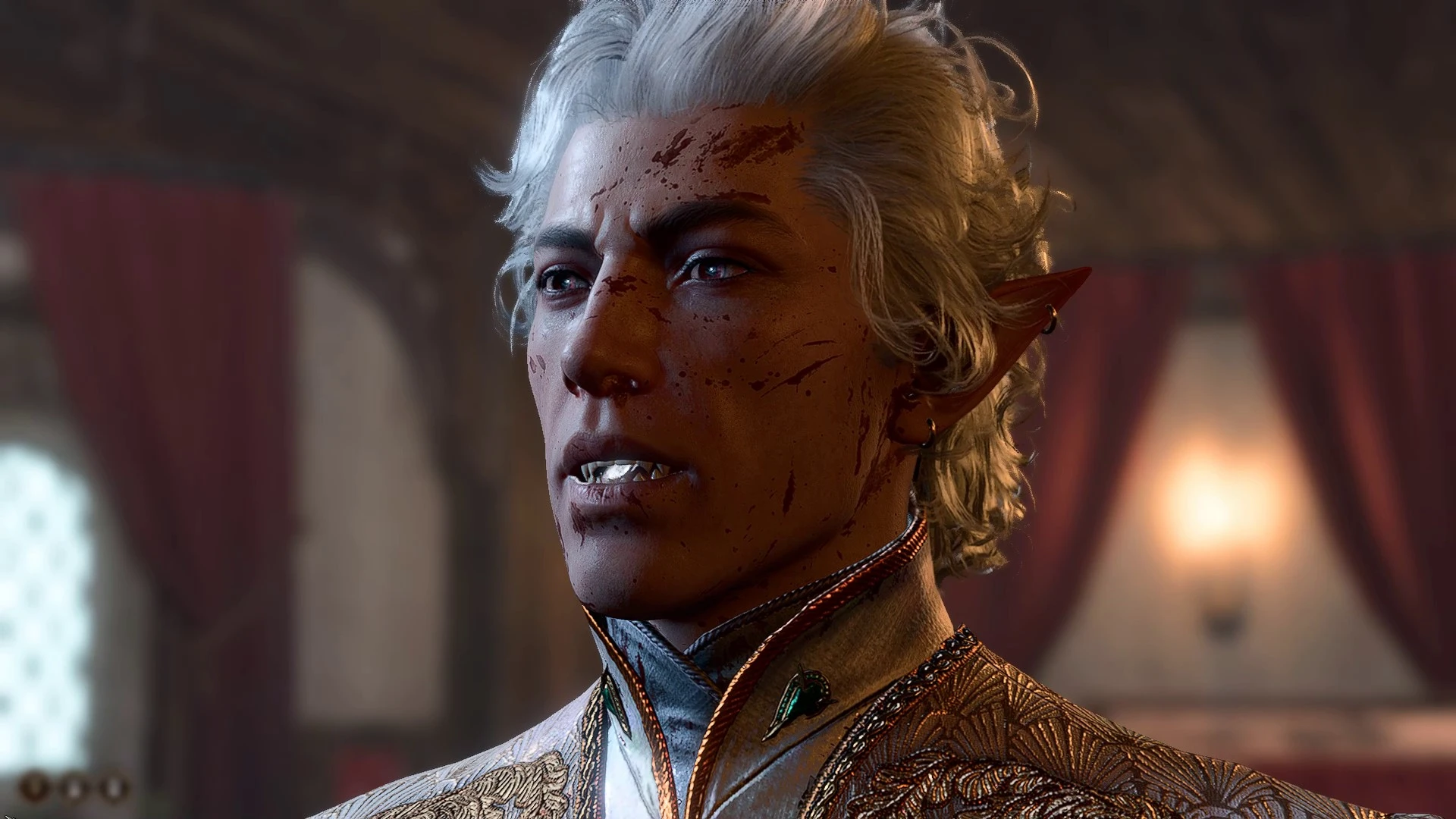
A mod for fans of maximum knife mouths— or if there's anyone else that just misses his OG piranha teeth:
ASTARION'S PATCH 5 TEETH: VERY SHARP SPAWN TEETH RETURN
WHAT THIS MOD DOES:
Reverts Astarion's full release delicate fangs back into his elongated tiefling fangs from Early Access (also more closely resembles depicted bg3 spawn fangs aside from the two frontmost incisors remaining flat; if someone wants an edit to match the full spawn set with shark teeth, feel free to let me know and I'll add it).
[ Other (optional) mods used in screencaps bc I just dig Astarion's MTG/release art look:
-
[]Lab's Boratory: Astarion's manicure (to match his Magic the Gathering claws)
[
]Natural Astarion Edit: face texture + darker brows (to smooth out the fidelity FX crunchy oversharpening + match his game release art)[]Astarion's earrings (underwear slot version): I just like them ]
TO INSTALL THIS MOD:
-
[]unzip the attached mod file, place it somewhere easy to access (desktop/downloads folder/etc)
[]copy the unzipped Generated folder, paste it into your SteamLibrary\steamapps\common\Baldurs Gate 3\Data folder (may differ if using GoG instead of steam)
[]fangs are now yours
- []delete the installed Generated folder (only delete this mod's . GR2 contents this note is for if you have other loose mods installed inside your Generated folder)
- fangs are now gone
BONUS STEP BY STEP VISUAL INSTALLATION GUIDE FOR BEGINNERS:
1: locate your downloaded .zip file
2: extract the downloaded file
3: locate the Generated file that's inside the unzipped file (this is the file you'll be transferring)
4: copy the Generated file, then paste the Generated file into your Baldurs Gate 3\Data folder
-
[]unzip the attached mod file, place it somewhere easy to access (desktop/downloads folder/etc)
A cosmetic mod for Baldur's Gate 3 that reverts Astarion's fangs to the longer, sharper tiefling-style fangs from Early Access, giving him a more menacing spawn look. For players who prefer the original piranha-like teeth over the delicate final design.
✨ Key Features
📊 Pros & Cons
✅ Pros
- Community-approved with 358 endorsements and over 7,300 downloads
- Brings back the OG piranha teeth for nostalgia lovers
- Lightweight cosmetic mod that doesn't mess with other aspects of Astarion
⚠️ Cons
- Only affects Astarion's fangs—if you wanted more spawn features, this won't cover it
- Last updated in September 2023, so it might not be compatible with the latest game patches
- No screenshots or detailed install instructions provided by the author
For Baldur's Gate 3 players who miss Astarion's Early Access look and want a more feral spawn aesthetic. Skip if you're happy with his current fangs or want broader cosmetic changes.
💡 Beginner Tips
- Place the mod files in your Mods folder (usually Documents/Larian Studios/Baldur's Gate 3/Mods) and enable them in the in-game mod manager.
- If you're using other Astarion appearance mods, load order matters—put this one after to ensure the fang change takes effect.
- Check for updates after game patches, as mods can break with new versions.
📊 Mod Details
- Game
- Baldurs Gate 3 Mods
- Author
- cobalt
- Version
- 1.1
- Downloads
- 7,306
- Endorsements
- 358
- Category
- Companions
- Created
- 9/7/2023
- Updated
- 9/16/2023
🔧 How to Install Baldurs Gate 3 Mods
Download from Nexus.
📖 Full step-by-step install guide for Baldurs Gate 3 →
Visit the official mod page for specific installation instructions for this mod.
🎮 Need cheat codes or console commands? Check ur gaming wiki for Baldurs Gate 3 commands, item IDs, and more.
Keep browsing — more Baldurs Gate 3 mods await