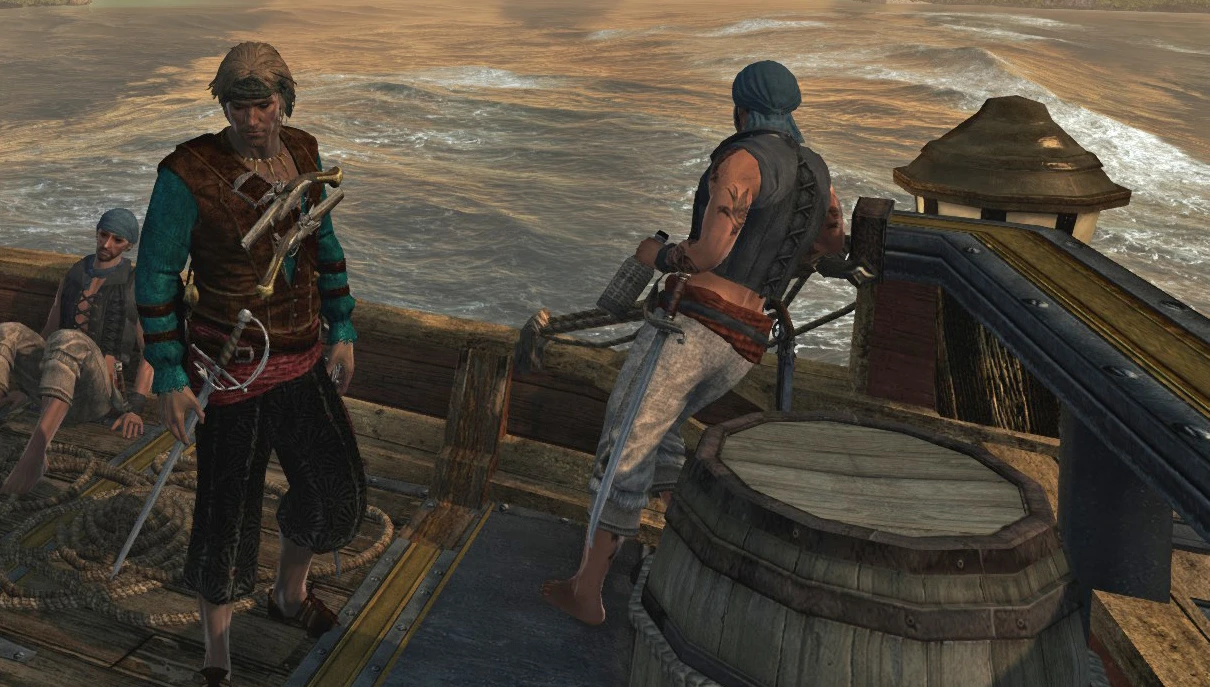
Master Kenway Kaizoku
⚪ Last updated 2019Preview
🔍 Analysis
- 🏆 #214 of 307 Characters mods in this game by downloads
📋 About This Mod
Hello Friend. how are you?I recommend you to install it manually. It worked for me in the first time. And now I only use this method.First, download and install RESOREP: https://www.undertow.club/downloads/resorep. 1254/download
Go to the folder:C:\Windows\System32\
Copy the fie "d3d11.dll" (System32\) paste it on you Black Flag main folder where .exe is and rename to:"ori_d3d11.dll"
Then, Copy "dx11proxy64.dll"
from the folder where you installed RESOREP and paste it in Black Flag main folder too, then rename this to:
"d3d11.dll"
- Create an TXT file named: "dllsettings.txt" file in the main game folder too. (.exe folder)
- Put the following text inside the TXT file: (now you need to put the path where your game is installed . Texts in () are just comments delete them, you can copy and past there, change paths and delete the comments):
version=1. 7. 0
modded_textures_folder=B:\JOGOS\Assassin's Creed IV Black Flag\RESOREP-MODDED (this is my game folder, plus a folder a created where I drop the modded files)
mod_creator_mode_enabled=false
dll_log_enabled=false
dll_log_file=B:\JOGOS\Assassin's Creed IV Black Flag\resorepDll.log (same main folder adress before the file name)
save_textures=false
original_textures_folder=B:\JOGOS\Assassin's Creed IV Black Flag\RESOREP-ORIGINAL (this is in case you activate creator mode so program will copy all texture it sees, for modders only)- Save and close dllsettings.txt file.
- Change the dllsettings.txt file extension to dllsettings.ini
- Run the game. All mods you get from Nexus, put there in the folder RESOREP-MODDED you
create, you can name it wherever you want to drop your mods there, just
make it the same name in text file, same for the original texture if you and to rip them.
Hope I helped you, thanks.
A small cosmetic mod that replaces the Wailer Outfit in Assassin's Creed IV: Black Flag with a Japanese-style outfit. With 9 endorsements and last updated in 2019, it's a niche choice for players seeking a samurai-inspired look.
✨ Key Features
📊 Pros & Cons
✅ Pros
- Gives Edward Kenway a fresh samurai vibe that fits the pirate theme
- Easy to install—just drop the files in and you're good
- Works for fans of Japanese aesthetics in historical settings
⚠️ Cons
- Tiny userbase (9 endorsements) means it's barely tested
- Last updated in 2019—might not work with newer game patches
- Only changes one outfit, so don't expect a full wardrobe overhaul
For Black Flag players who want a quick visual change to Edward's outfit without messing with gameplay. Perfect if you're into samurai or Japanese culture and want to mix it with piracy. Skip if you're looking for more substantial content or multiple outfit options.
💡 Beginner Tips
- Make sure to back up your original game files before replacing the outfit, just in case you want to revert.
- If you're using a mod manager, you can preview the outfit in-game before committing to it.
- Check the mod's comments section for any known issues with specific game versions.
📊 Mod Details
- Game
- Assassinscreedivblackflag Mods
- Author
- texturemods
- Version
- 1.0
- Downloads
- 174
- Endorsements
- 9
- Category
- Characters
- Created
- 10/14/2019
- Updated
- 10/14/2019
🔧 How to Install Assassin's Creed IV: Blac Mods
Download from Nexus Mods.
📖 Full step-by-step install guide for Assassin's Creed IV: Blac →
Visit the official mod page for specific installation instructions for this mod.
🎮 Need cheat codes or console commands? Check ur gaming wiki for Assassin's Creed IV: Blac commands, item IDs, and more.
Keep browsing — more Assassin's Creed IV: Blac mods await