An easy RESOREP method to let you use all texture mods
⚪ Last updated 2020Preview
🔍 Analysis
- 👍 3.4% endorsement rate — high engagement, a strong quality signal
- 🏆 #1 of 56 Miscellaneous mods in this game by downloads
📋 About This Mod
Hi. I simplified the method as much as I can. Please give it a try, as before this we were unable to mod Black Flag at all... And once you set it up, installing texture mods is going to be like: "I throw these textures in this folder" and boom... REALLY, This is just 7 easy steps....
For starters:
RESOREP does not change the game. It is a directx hook that access the textures stored in RAM when the game runs, and swaps them with the textures you throw in your mod folder.
First rule: you should ALWAYS only throw dds texture files in that folder. Without any additional folders. The game knows the textures by their file name....
1.: Download my zip on THIS mod page. It is a frame. Locate the folder where your game is installed (the one that contains AC4BFSP.exe).
----------------------------------------------------------
2.: Copy the contents of my zip to that folder. (the .ini file and the two empty folders) so the dllsettings.ini and the two folders from the zip will sit right next to your game exe.
----------------------------------------------------------
3.: open the dllsettings.ini file with notepad, or similar.
now... in this file You must change all C:\Program Files (x86)\Ubisoft\Ubisoft Game Launcher\games\Assassin's Creed IV Black Flag\ to the path YOUR game is installed in. So for example, if you have AC4BFSP.exe in D:\Games\Black Flag\, you should do this:
instead of:
modded_textures_folder=C:\Program Files (x86)\Ubisoft\Ubisoft Game Launcher\games\Assassin's Creed IV Black Flag\modded_textures_folder
change it to:
modded_textures_folder=D:\Games\Black Flag\modded_textures_folder
and do the same for all the parts where it says C:\Program Files (x86)\Ubisoft\Ubisoft Game Launcher\games\Assassin's Creed IV Black Flag\
then save the file in notepad, and close it.
----------------------------------------------------------
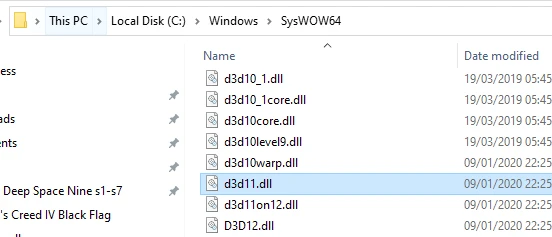
4.: If you have windows 10, go to your windows directory, and there to SysWOW64 directory. For most people it is:
C:\Windows\SysWOW64
Copy the d3d11.dll you see there to your game directory. (where your ACBFSP.exe is located)
Once it is there, Rename it to ori_d3d11.dll
(If you have a 32 bit system, or any windows that does not have SysWOW64 inside the windows directory, you would need d3d11.dll stored in Windows\System32 directory. But ONLY then!)
----------------------------------------------------------
5.: You must understand, that most probably Nexusmods does not like
A tutorial/framework that simplifies using Resorep to enable all Assassin's Creed IV: Black Flag texture mods. It provides an easy installation method for less technical users, with 1,192 endorsements and 35,413 downloads, last updated in May 2020.
✨ Key Features
📊 Pros & Cons
✅ Pros
- Huge community trust with 1,192 endorsements and 35k+ downloads
- Makes texture modding accessible to everyone, not just tech wizards
- One-time setup unlocks the entire texture mod library for Black Flag
⚠️ Cons
- Last updated in 2020 — may not cover newer Resorep versions or game patches
- It's a tutorial, not an automated tool — you still have to follow the steps yourself
- No screenshots or video guide mentioned, so you're relying on text instructions
For Black Flag players who want to use texture mods but find the technical setup intimidating. Also great for modding newcomers who prefer a guided approach. Skip if you're already comfortable with Resorep or prefer automated mod managers.
💡 Beginner Tips
- Follow the tutorial exactly as written — skipping steps can break the texture loading.
- Make sure you have the latest version of Resorep installed before starting.
- Test with one texture mod first to confirm everything works before adding more.
📊 Mod Details
- Game
- Assassinscreedivblackflag Mods
- Author
- Daoreth or Daniel Wolf if you know me better that way
- Version
- 1.0
- Downloads
- 35,413
- Endorsements
- 1,192
- Category
- Miscellaneous
- Created
- 5/20/2020
- Updated
- 5/20/2020
🔧 How to Install Assassin's Creed IV: Blac Mods
Download from Nexus Mods.
📖 Full step-by-step install guide for Assassin's Creed IV: Blac →
Visit the official mod page for specific installation instructions for this mod.
🎮 Need cheat codes or console commands? Check ur gaming wiki for Assassin's Creed IV: Blac commands, item IDs, and more.
Keep browsing — more Assassin's Creed IV: Blac mods await