Yakov's Performance Mod 1.0
⚪ Last updated 2024This mod may not work until the author updates it. Check for an update, or see the rollback guide.
Preview
🔍 Analysis
- 👍 2.2% endorsement rate — high engagement, a strong quality signal
- 🏆 #1 of 19 Visuals and Graphics mods in this game by downloads
📋 About This Mod
UPDATE 12/7/24: The mod is now integrated in 1. 0 B316 experimental, which means it will likely be in the final stable release. you no longer need this mod for 1. 0, but if you wish to use it for versions before B316, I will leave the mod up for that.
The mod works with any version of 7 Days to die.
NOTE : Not compatible with EAC. (Easy Anti Cheat) Ensure it is turned off on both client & server. Only clients need the mod.
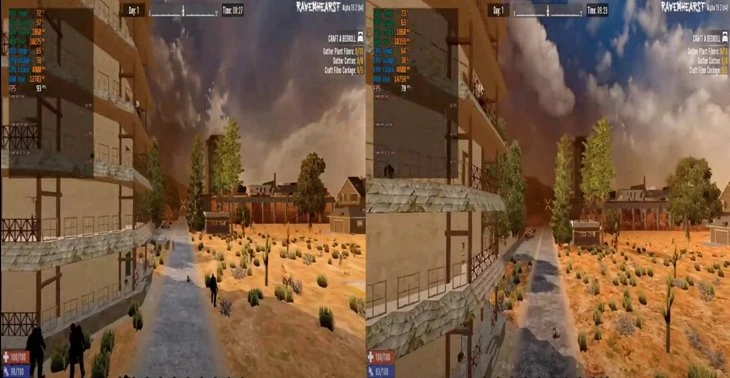
The mod can increase FPS by sometimes up to 30-50 by enabling a feature called Graphics Jobs that isn't enabled in the 7 days to die Unity Project.
Performance will vary.
Unzip in your 7 Days to Die folder and overwrite.
Performance Mod (Any Version) Download
Technical babble:
In Unity, Graphics Jobs is a feature that, when enabled, allows for multiple native threads to generate graphics commands concurrently. Typically, these commands are used to tell the graphics API (like DirectX 12 or Vulkan) how to render scenes on the screen.
By default, Unity might use a single thread to process these commands, which can become a bottleneck, especially in complex scenes where there are a lot of drawing commands that need to be processed every frame.
-
[]Concurrent Command Generation: By using multiple threads to generate graphics commands, Unity can take advantage of multi-core processors to perform more work in parallel. This means that while one core is working on one set of commands, another core can work on a different set, reducing the time it takes to process all commands for a frame.
[
]Native Format Command Recording: The commands are recorded in a native graphics API format (GCMD), which is directly understood by the graphics drivers and hardware. This avoids the overhead of Unity having to translate or interpret commands into a different format before they are sent to the graphics API.[]Reduced API Overhead: With Graphics Jobs, commands are generated by directly calling GfxDevice functions, which means there's less overhead from Unity's end before the commands are submitted to the API. This streamlined process allows the graphics hardware to receive instructions more quickly and efficiently.
[]Platform-Specific Devices: Since the commands are translated into platform-specific instructions, such as DirectX 12 or Vulkan command buffers, they are optimized for the capabilities of the user's hardware. This means better utilization of the graphics card's features and potentially higher performance.
Yakov's Performance Mod enables Unity's Graphics Jobs feature in 7 Days to Die, allowing multiple native threads to generate graphics commands concurrently. This can increase FPS by up to 30-50, though performance varies. The mod is now integrated into version 1.0 B316 experimental, but remains available for earlier versions. It is not compatible with Easy Anti-Cheat.
✨ Key Features
📊 Pros & Cons
✅ Pros
- High endorsement count of 1,827 indicates community approval.
- Over 82,000 downloads show widespread usage.
- Recently updated in 2024, indicating active maintenance.
⚠️ Cons
- Not compatible with Easy Anti-Cheat, requiring it to be disabled.
- Performance gains are variable and not guaranteed.
- Mod is now integrated into the base game for version 1.0 B316+, making it redundant for those users.
This mod is for players using 7 Days to Die versions before B316 who want to boost FPS by enabling Graphics Jobs. It suits those with multi-core processors who are willing to disable Easy Anti-Cheat. Players on the latest experimental or stable builds may not need it since the feature is integrated.
💡 Beginner Tips
- Ensure Easy Anti-Cheat is turned off in both the game launcher and server settings before using the mod.
- Back up your game files before overwriting, in case you need to revert.
- Test performance in different areas of the game to see the actual FPS improvement.
📊 Mod Details
- Game
- 7 Days To Die Mods
- Author
- YakovAU
- Version
- 1.0
- Downloads
- 82,801
- Endorsements
- 1,827
- Category
- Visuals and Graphics
- Created
- 12/24/2021
- Updated
- 6/25/2024
🧩 Commonly Used Together
Users add these mods to the same collections — a real compatibility signal, not an AI guess.
🔧 How to Install 7 Days to Die Mods
Use Vortex or manual. Most mods go in /Mods/ folder.
📖 Full step-by-step install guide for 7 Days to Die →
Visit the official mod page for specific installation instructions for this mod.
🎮 Need cheat codes or console commands? Check ur gaming wiki for 7 Days to Die commands, item IDs, and more.
Keep browsing — more 7 Days to Die mods await